
How to evaluate your use of classroom technology with the PICRAT framework
There’s always something new to consider when teaching with technology. From the latest advancements in AI, to new software and hardware updates, it can be difficult to know which tools to use and how to incorporate it effectively into your lessons.
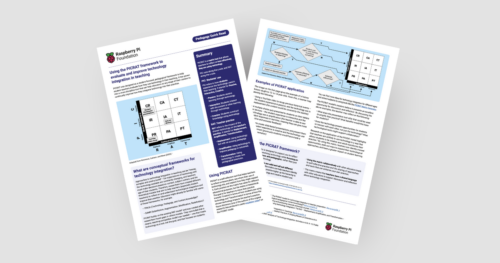
In today’s blog, we explore the PICRAT framework and how it can help you reflect on your use of technology in the classroom.
We also share our new PICRAT Quick Read, which you can download for free to:
- Find practical tips on how to use the PICRAT model when planning your lessons
- Read a summary of the research behind the framework
What is the PICRAT framework?
Technology is constantly changing, and educators must continually decide what tools to use in their practice. To help with this challenge, researchers started developing theoretical models that teachers (especially student teachers) could use to reflect on how they integrate technology in their classrooms.
You might already be familiar with frameworks like TPACK (Technology, Pedagogy, and Content Knowledge) and SAMR (Substitution, Augmentation, Modification, Redefinition). While these models are useful, the PICRAT framework was created to address gaps in these earlier models, offering a clearer, student-focused approach. Significantly, it encourages you to treat technology as a tool to support learning, rather than the goal itself.
It asks two simple questions: “How are students experiencing the technology?” and “How does this impact your practice?”. The answers to these questions form a matrix as pictured below.
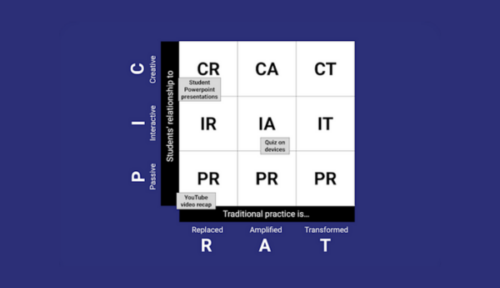
PIC (which runs along the y-axis) refers to the student’s relationship to the technology:
- Passive – Students receive learning through technology
- Interactive – Students interact with the content or other learning through technology
- Creative – Students construct knowledge using technology
RAT (which runs along the x-axis) refers to how the teacher uses the technology:
- Replaces – Using technology but with an existing pedagogy
- Amplifies – Using technology to improve pedagogy or outcomes
- Transforms – Using technology to create new pedagogical practices
How can I apply the PICRAT model?
First choose the lesson you’re planning to deliver. Consider what activities you’ll be running and the technologies involved. You’ll then be able to plot where they sit on the matrix using the PICRAT acronym.
For example, if you are teaching a lesson on Python loops, you might initially plan for students to watch a pre-recorded coding tutorial on their laptops. In this scenario, the student experience is Passive (receiving info via tech), and the teacher’s use is Replacement because the video simply replaces a live lecture. To move up the matrix, you could instead have students use an online IDE to complete a “Parson’s Problem” puzzle where they rearrange blocks of code to fix a loop. This shifts the activity to Interactive and Amplification, as the digital tool provides immediate debugging feedback that a paper-based exercise could not.

Next, think about how you might move your practice forwards. Although every position on the matrix has its own value, the framework is hierarchical. The overall goal is to try to move your practice towards the top right of the matrix to be Creative and Transformative.
To help you achieve this, take some time to reflect on your current lessons, activities, and the technologies you use. Ask yourself questions like:
- What does the technology I’m using offer that could be used to amplify my practice?
- What benefits would this have for students?
- Does the technology present opportunities for students to interact with each other, not just the technology?
- What other technological tools might support collaboration?
Research highlights that technology is rarely used in ways that allow young people to be creative. By using the PICRAT matrix, teachers can identify missed opportunities and explore ways to transform their lessons, ensuring learners can be creative and thrive.
The benefits of the PICRAT model
Potential benefits for educators:
- The framework encourages meaningful reflections, allowing teachers to easily evaluate how they’re using technology within their lessons
- Reflections and the PICRAT matrix helps teachers to identify missed opportunities and gaps in their practice, ultimately leading to better student experiences

You can use the PICRAT framework as part of your own reflections, or as part of a group activity. It’s a great way to spark discussion about technology integration with colleagues and improve best practices.
Want to find out more about the PICRAT framework?
If you’d like to learn more about the PICRAT model, you can download our Quick Read for free via our new Pedagogy Quick Reads page.




No comments