
Reintroducing Code Classroom – now with the Blocks editor
Code Classroom — formerly known as the Code Editor for Education — is our free, safe tool for teaching and learning computing and programming. We’re delighted to share that Code Classroom now includes our new Blocks editor, based on the open-source Scratch editor.
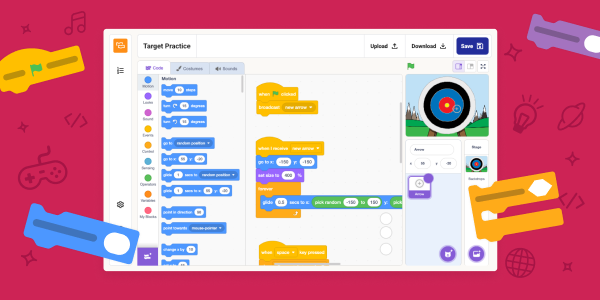
With the Blocks editor, Code Classroom offers the familiar creative programming experience used by millions of young learners worldwide, plus all its helpful features for teachers. You can now inspire learners’ imagination and build their confidence through drag-and-drop coding in the same tool over 4500 schools already use to teach Python and web development.
Early feedback on this Code Classroom addition has been very encouraging. One UK computer science teacher told us:
“I think it’s going to be hugely transformative for schools… Not just Scratch. Python, HTML and CSS… all in one platform is enormous.”
Bartholomew Owuor, a computer science teacher at Cathsam School in Kenya said:
“When the coding blocks were introduced, I was able to widen my scope and to include so many learners from different ages.”
All Code Classroom features, including the Blocks editor, are now also available when you use Experience CS.
Made for the classroom
Code Classroom is built for schools and shaped by real teacher feedback. Every feature is designed around how teachers and students actually work.
- Free forever: Completely free to use, with no hidden costs or subscriptions
- Private by default: A secure environment designed for schools’ needs
- Built-in classroom / learning management: Create classes, assign work, and track learner progress in one simple platform
Up and running in minutes
There’s no software to install and nothing for your school’s IT team to manage. Code Classroom runs in the browser, so you can set up your classes, add your students, and be ready to teach by your very next lesson.
Code Classroom is now also integrated with Google Classroom. That means you can import your existing classes with just a few clicks, which reduces setup time. With Google single sign-on for students, everything stays connected and easy to manage. You can spend less time on administration and more time on teaching.
Three ways to learn, one platform
- Blocks editor: Where young people can drag and drop colourful blocks to code games, stories, and animations, learning core programming concepts without needing to type
- Python editor: Where learners can move from typing their very first text-based program all the way to the skills and confidence to write and understand code
- Web editor: Where young people can design and build their own web pages with text-based HTML and CSS
With all three editors in one place, you can support every student, whatever their coding experience.



No comments
Jump to the comment form